

Tested with React Native 0.88.0, React 19.3.1, Jest 30.5.2 with @react-native/jest-preset 0.88.0, @testing-library/react-native 14.1.0, msw 2.15.0; npm registry checks for msw 3.0.3 and @msw/react-native; Node 22.23.3; 2026-10-15. Not run on a simulator or device.
To mock APIs in React Native, you need different tools for three different places: Jest tests, the running app in a simulator, and end-to-end tests with Detox or Maestro. This guide covers each one: MSW in Jest (tested), MSW and Expo in the running app (including the MSW 3 change that broke the old setup), Mirage JS, mock servers and the Android 10.0.2.2 gotcha, record/replay, and debugging tools.
TL;DR
For React Native, use MSW (msw/node) in Jest tests. For the running app, MSW 3’s @msw/react-native isn’t on npm yet (we got a registry 404 on 2026-10-15), so pin msw 2’s msw/native or point the app at a mock server. Use Mirage JS when you want an in-memory fake backend with relationships, a mock server like Mockoon or Prism for E2E, and a record/replay tool such as Mockifyer (built by this site’s maintainer) when you want to capture real responses.
| Approach | Jest tests | Running app | E2E (Detox/Maestro) | Records real traffic |
|---|---|---|---|---|
MSW (msw/node; in-app via msw 2 msw/native until @msw/react-native ships) | Yes (tested) | Yes (msw 2) | Yes (app built with mocks) | No |
| Mirage JS | Yes | Yes | Yes | No |
| Mock server (Mockoon / Prism / WireMock) | Possible | Yes (via base URL) | Yes | Mockoon, WireMock: yes |
| Mockifyer* | Node/Jest entry point per README | Yes (per README) | Yes, launch-argument scenarios (per README) | Yes |
*Built and maintained by the owner of devxtools.dev.
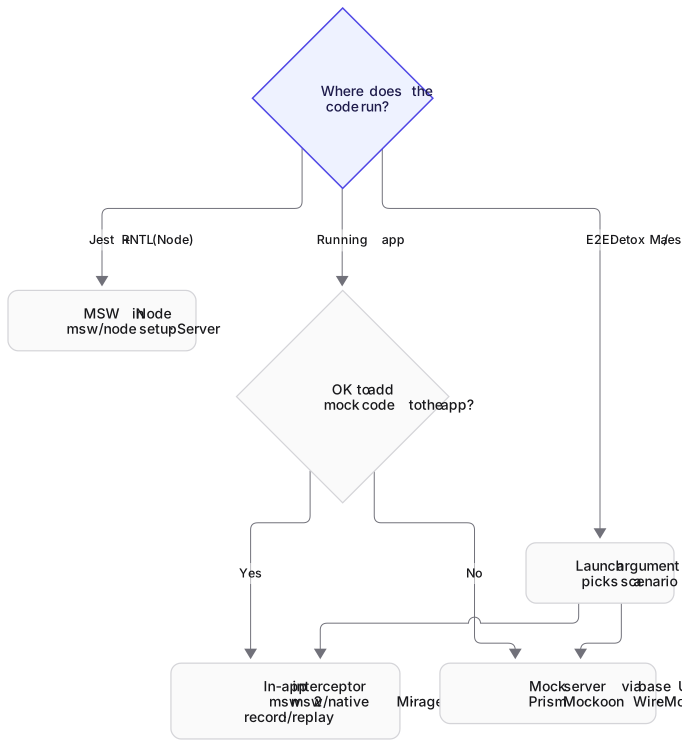
Three places you need mocks
- Jest tests (unit and component). Jest runs in Node, not on a device. You can use MSW’s Node integration, and you’re testing components with React Native Testing Library (RNTL).
- The running app (simulator, device, Expo Go or a dev build). No Node and no Service Worker. Mocks must patch
fetch/XMLHttpRequestinside the JS runtime, or the app must call a different base URL. - E2E (Detox, Maestro). A real build runs on a simulator or device. You either bundle in-app mocks (switched on by a launch argument or env var), or point the build at a mock server you control from the test.
Most confusion comes from using a tool designed for one place in another.
Mocking in Jest and RNTL with MSW
MSW intercepts fetch at the network level, so your component calls the real fetch and your tests describe responses, not implementation details. This is the setup we ran with React Native 0.88:
// src/mocks/handlers.js
import { http, HttpResponse } from 'msw';
import { API_URL } from '../api';

export const handlers = [
  http.get(`${API_URL}/users/:id`, ({ params }) =>
    HttpResponse.json({ id: Number(params.id), name: 'Ada Lovelace' })),
];
// src/mocks/server.js
import { setupServer } from 'msw/node';
import { handlers } from './handlers';
export const server = setupServer(...handlers);// jest.setup.js
import { server } from './src/mocks/server';
beforeAll(() => server.listen({ onUnhandledRequest: 'error' }));
afterEach(() => server.resetHandlers());
afterAll(() => server.close());// __tests__/UserScreen.test.js
import React from 'react';
import { render, screen } from '@testing-library/react-native';
import { http, HttpResponse } from 'msw';
import { server } from '../src/mocks/server';
import { API_URL } from '../src/api';
import { UserScreen } from '../src/UserScreen';
test('shows the user from the API', async () => {
await render(<UserScreen id={1} />);
expect(await screen.findByText('Ada Lovelace')).toBeOnTheScreen();
});
test('shows an error when the API fails', async () => {
server.use(http.get(`${API_URL}/users/:id`, () => new HttpResponse(null, { status: 500 })));
await render(<UserScreen id={1} />);
expect(await screen.findByText('Something went wrong')).toBeOnTheScreen();
});Both tests passed. Three things tripped us up, and they’ll trip you up too:
-
Jest config for ESM dependencies. msw 2.15 depends on ESM-only packages shipped as
.mjs(rettime,@open-draft/deferred-promise). The React Native preset doesn’t transform.mjsor anything innode_modulesoutside React Native, so we gotMust use import to load ES Module. This config fixed it:// jest.config.js const preset = require('@react-native/jest-preset'); module.exports = { preset: '@react-native/jest-preset', setupFilesAfterEnv: ['<rootDir>/jest.setup.js'], transform: { ...preset.transform, '^.+\\.mjs$': 'babel-jest' }, transformIgnorePatterns: [ 'node_modules/(?!((jest-)?react-native|@react-native(-community)?|msw|@mswjs|rettime|until-async|@open-draft)/)', ], }; -
RNTL 14’s
renderis async. Withoutawait render(...)we got “renderfunction has not been called”. -
MSW 3 vs MSW 2 in Jest. We used msw 2.15 so the same version works in Jest and in the app (below). MSW 3 is ESM-only (Node ≥22.12), and in our earlier Jest runs CommonJS Jest needed Node 24.9+ plus
--experimental-vm-modulesto load it (see also MSW vs Nock). MSW 3 renamedonUnhandledRequesttoonUnhandledFrame.
Mocking in the running app
MSW in the app: the MSW 3 situation
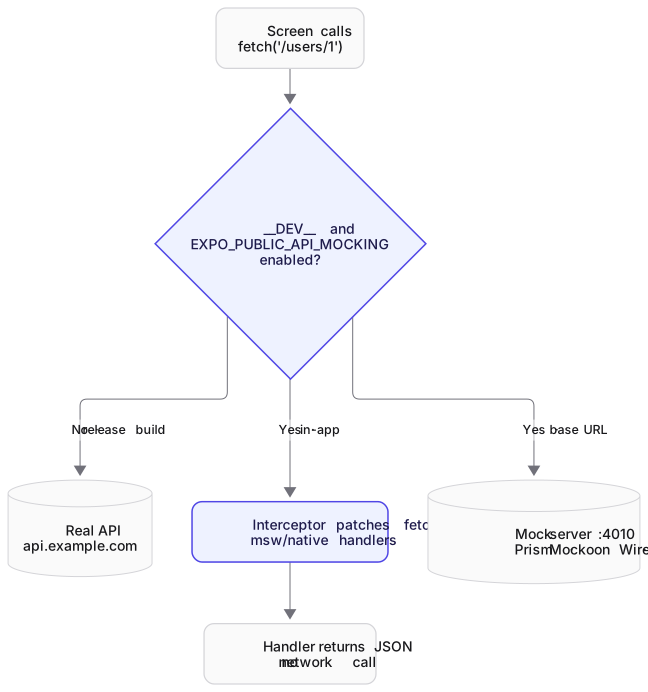
MSW 3.0 (released 2026-09-28) removed the msw/native export. MSW’s docs now tell you to install @msw/react-native, but on 2026-10-15 npm install @msw/react-native fails with a 404: the package isn’t published. Until it ships, you have two options:
Option 1: pin msw 2. [email protected] is the last 2.x release and still exports ./native. MSW 2’s docs list two polyfills, imported before MSW:
// src/mocks/native.js (msw 2.x only; per MSW 2 docs, not run on a device by us)
import 'fast-text-encoding';
import 'react-native-url-polyfill/auto';
import { setupServer } from 'msw/native';
import { handlers } from './handlers';

export const server = setupServer(...handlers);
npm i -D [email protected] react-native-url-polyfill fast-text-encodingMSW’s own docs label the React Native integration “use at your own risk”. Recheck npm view @msw/react-native before you start; when it ships, follow its install docs and upgrade Jest and app together.
Option 2: point the app at a mock server (next sections). It needs no in-app interception at all, so the MSW change doesn’t affect it.
Expo specifics
The same MSW 2 setup applies to Expo dev builds and Expo Go, because it only patches JavaScript. Expo inlines environment variables prefixed with EXPO_PUBLIC_ at build time (per Expo’s docs), which makes a clean switch:
// app/_layout.js or index.js (pattern; not run on a device by us)
async function enableMocking() {
  if (!__DEV__ || process.env.EXPO_PUBLIC_API_MOCKING !== 'enabled') return;
  await import('./src/mocks/msw.polyfills');   // fast-text-encoding + url polyfill
  const { server } = await import('./src/mocks/native');
  server.listen({ onUnhandledRequest: 'bypass' });
}

enableMocking().then(() => {
  // register / render your app here
});
Run with EXPO_PUBLIC_API_MOCKING=enabled npx expo start. Because EXPO_PUBLIC_ values are inlined, never put secrets in them, and remember to restart Metro (-c clears the cache) when you change one.
Toggling mocks with __DEV__, env vars or a dev menu
__DEV__isfalsein release builds. Use it as an outer guard so mocks can never ship enabled.- An env var (
EXPO_PUBLIC_API_MOCKING, orreact-native-configin bare apps) chooses mocks per Metro session. - A dev-menu or in-app switch lets QA change scenarios without rebuilding. A common pattern is a hidden settings screen that stores the scenario (
happy,empty,server-error) in AsyncStorage and callsserver.use(...scenarioHandlers)on change.
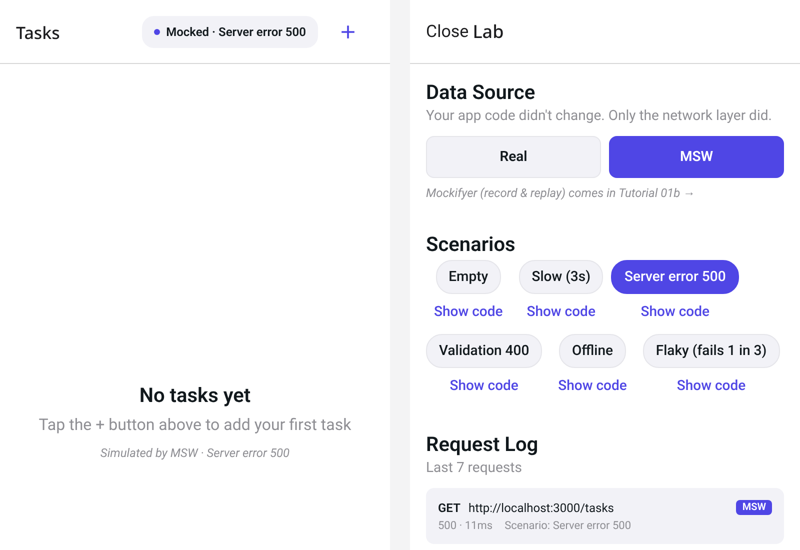
fetch returns without a rebuild, and the request log shows which handler answered.Mirage JS in React Native
Mirage JS runs a fake backend inside the app: models, factories, relationships and an in-memory database, with route handlers. Its official React Native quickstart creates the server alongside your networking code and shuts down any existing server first, so hot reloading doesn’t create duplicates:
import { createServer } from 'miragejs';

if (window.server) window.server.shutdown();
window.server = createServer({
  routes() {
    this.get('/api/movies', () => ({ movies: [{ id: 1, name: 'Inception', year: 2010 }] }));
  },
});
Choose Mirage when your UI needs a stateful fake (create a todo, see it in the list, delete it) without writing that logic in every handler. One caveat: the latest release is 0.1.48 (October 2023), so it’s mature but slow-moving. MSW is more active.
Record and replay real responses
Hand-writing handlers is fine for 10 endpoints, and tedious for 200. Record/replay tools capture real responses once and replay them offline.
Polly.js (tool page) is the best-known JavaScript record/replay library, but its adapters target Node HTTP, fetch/XHR in browsers and Puppeteer, and its docs don’t cover React Native. We didn’t test it in React Native. Expect to write your own persister setup if you try.
Mock servers can record too: Mockoon and WireMock both have proxy/record modes, which keep recordings outside the app.
Mockifyer (built and maintained by this site’s owner, see the disclosure at the top) records axios and fetch responses to JSON files in your repo and replays them. According to its README and React Native docs (not tested by us on a device for this page):
@sgedda/mockifyer-fetch(MIT, 1.8.100 on npm) patchesglobal.fetchin React Native and Expo viasetupMockifyerForReactNative.- In development, a “Hybrid” provider writes mocks to the device and to the project’s
mock-data/folder through Metro endpoints. Release builds load bundled mocks from memory. MOCKIFYER_MODEcontrols activation (on,manualwith a runtime toggle,launch_clientfor E2E-only,offfor store builds). Scenarios can be selected by ascenariolaunch argument viareact-native-launch-arguments, which suits Detox and Maestro.- Node and Jest use the separate
setupMockifyerentry points.
For recording the backend API your app calls, not just the app’s fetch, Keploy records the backend service; it does not patch fetch inside React Native.
Pointing the app at a mock server
A mock server runs on your machine (or in CI), and the app’s base URL points at it. No in-app mocking code, works with any HTTP client, and identical in dev and E2E.
- Prism serves responses from an OpenAPI spec:
npx @stoplight/prism-cli mock openapi.yaml. Prism 5.16.0 declares Node >=24.18.0 in itsenginesfield. - Mockoon has a desktop app plus
mockoon-cli start --data env.json(or an OpenAPI file). - WireMock offers JSON stub mappings, fault injection and record/playback, in Java or Docker.
Which host does the app use?
| Where the app runs | URL for a server on your machine |
|---|---|
| iOS Simulator | http://localhost:4010 (the simulator shares the Mac’s network) |
| Android Emulator | http://10.0.2.2:4010 (10.0.2.2 is the emulator’s alias for the host loopback) |
| Android, either | adb reverse tcp:4010 tcp:4010, then http://localhost:4010 |
| Physical device | Your machine’s LAN IP, e.g. http://192.168.1.20:4010 (bind the server to 0.0.0.0) |
// src/config.js
import { Platform } from 'react-native';

const MOCK_HOST = Platform.OS === 'android' ? 'http://10.0.2.2:4010' : 'http://localhost:4010';
export const API_URL = process.env.EXPO_PUBLIC_API_MOCKING === 'enabled' ? MOCK_HOST : 'https://api.example.com';
Plain HTTP gotchas: Android blocks cleartext HTTP by default for apps targeting Android 9 (API 28) and later, and iOS App Transport Security restricts plain HTTP too. Debug builds of new React Native projects are usually configured for local development, but if requests to a LAN IP fail silently, check these settings first.
Mocking during E2E with Detox and Maestro
E2E tests run a real build, so pick mocks at launch time:
Detox passes launch arguments to the app (per Detox’s device API docs):
await device.launchApp({ newInstance: true, launchArgs: { mockScenario: 'empty-cart', mockServerPort: 4010 } });Maestro passes arguments on launchApp (per Maestro’s docs):
- launchApp:
    clearState: true
    arguments:
      mockScenario: "empty-cart"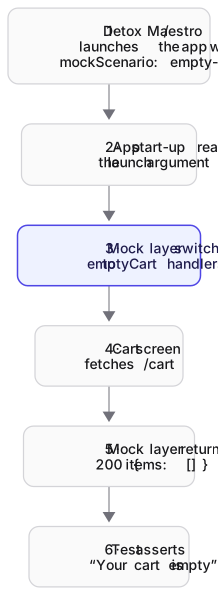
In the app, read them with react-native-launch-arguments (4.1.1) and select handlers or a base URL. Two common setups:
- In-app mocks keyed by scenario: a build with MSW, Mirage or Mockifyer included, plus the scenario from launch args. It’s fast and needs no network, but it’s a special build.
- Mock server per test: the app points at a mock server, and the test resets or reconfigures the server before each scenario (WireMock and Mockoon have admin APIs). Your release-like build stays closer to production.
Debugging requests
- Reactotron (
reactotron-react-native5.3.1) shows API requests and responses from the JS side, alongside state and logs. - Flipper: React Native 0.74 removed the native Flipper integration, and the release notes say using Flipper for network inspection and other React Native plugin features “is now unsupported”. Don’t build new workflows on it.
- Proxyman and Charles are system-level HTTP(S) proxies. They see real device or simulator traffic, including native SDK calls that JS-level tools miss. HTTPS needs their root certificate installed on the simulator or device.
Which should you choose?
| If you need… | Use |
|---|---|
| Component tests with realistic network behaviour | MSW in Jest (msw/node) |
| The same handlers in Jest and in the app, today | msw 2.15 everywhere (msw/node + msw/native), until @msw/react-native ships |
| A stateful fake backend in the app | Mirage JS |
| Mocks that don’t touch app code, shared with web and backend teams | A mock server (Prism from OpenAPI, Mockoon, WireMock) |
| Realistic data captured from the real API, replayed offline | Record/replay: Mockifyer* in-app, or Mockoon/WireMock proxy recording |
| E2E scenarios | Launch arguments plus in-app mocks, or a mock server reset per test |
*Built by this site’s maintainer.
FAQ
How do I mock an API in React Native?
In Jest tests, use MSW’s setupServer from msw/node with React Native Testing Library. In the running app, either pin msw 2.15 and use msw/native with the URL and TextEncoder polyfills, or point the app’s base URL at a mock server such as Prism, Mockoon or WireMock.
Does MSW work with React Native and Expo?
In Jest, yes: it runs in Node (we tested msw 2.15 with React Native 0.88). In the app, MSW 3 removed msw/native in favour of @msw/react-native, which wasn’t published on npm as of 2026-10-15. MSW 2’s msw/native with polyfills works with bare React Native and Expo per MSW 2’s docs, labelled “use at your own risk”.
How do I mock fetch in React Native Jest tests?
Use MSW so components call the real fetch and handlers return responses. With the React Native Jest preset, allow msw’s ESM dependencies to be transformed (transform .mjs and extend transformIgnorePatterns), and await render(...) with RNTL 14. For a one-off, jest.spyOn(global, 'fetch') also works.
How do I reach a local mock server from the Android emulator?
Use http://10.0.2.2:<port>, the emulator’s alias for your machine’s loopback, or run adb reverse tcp:<port> tcp:<port> and use localhost. iOS Simulator can use localhost directly. Physical devices need your machine’s LAN IP and a server bound to 0.0.0.0.
How do I mock APIs in Detox tests?
Pass a scenario via device.launchApp({ launchArgs: { ... } }), read it in the app with react-native-launch-arguments, and enable the matching in-app mocks or base URL. Or point the build at a mock server and reset it before each test through its admin API.
What is the best mock API tool for React Native?
There isn’t one tool for every layer. MSW is the strongest default for Jest. A mock server is the most robust option for the running app and E2E right now. Mirage helps when you need a stateful fake backend. Record/replay tools such as Mockifyer (built by this site’s maintainer) suit large APIs where hand-writing handlers is impractical.
Related
- MSW · Mirage JS · Mockifyer · Polly.js
- Mockoon · Prism · WireMock
- Detox · Maestro · Reactotron · Proxyman · Charles
- MSW vs Nock · recording the backend API your app calls, not just the app’s fetch · Mocking & test data · Testing
Sources
All accessed 2026-10-15.
- MSW 3.0.0 release notes (
msw/nativeremoved, ESM-only,onUnhandledFrame): https://github.com/mswjs/msw/releases/tag/v3.0.0 - MSW React Native integration docs (
@msw/react-native, “use at your own risk”): https://mswjs.io/docs/integrations/react-native - npm registry:
@msw/react-native404;mswlatest 3.0.3;[email protected]exports./native: https://registry.npmjs.org/msw - MSW 2.x React Native docs (polyfills,
msw/native): https://github.com/mswjs/mswjs.io/blob/0c651c0b6916c482ffe6133a64c9aa876d02e625/websites/mswjs.io/src/content/docs/integrations/react-native.mdx - Jest ESM and
require(esm)on Node 24.9+: https://jestjs.io/docs/ecmascript-modules - React Native Testing Library: https://oss.callstack.com/react-native-testing-library/
- Expo environment variables: https://docs.expo.dev/guides/environment-variables/
- Mirage JS React Native quickstart: https://miragejs.com/quickstarts/react-native/development/
- Mockifyer README and REACT_NATIVE.md (maintained by the site owner): https://github.com/sgedda/mockifyer
- Polly.js docs: https://netflix.github.io/pollyjs/
- Android emulator networking (10.0.2.2): https://developer.android.com/studio/run/emulator-networking
- Android network security config (cleartext default): https://developer.android.com/privacy-and-security/security-config
- Detox device API (
launchArgs): https://wix.github.io/Detox/docs/api/device/ - Maestro
launchApp(arguments): https://docs.maestro.dev/api-reference/commands/launchapp - React Native 0.74 release notes (Flipper plugin removal): https://reactnative.dev/blog/2024/04/22/release-0.74
- Reactotron docs: https://docs.infinite.red/reactotron/